| Version 4.1 |
| |
- Folder grouping for drawings.
- Add Multiple Drawings Simultaneously.
- IFC 4 support.
- Additional Colours and Hatching for Dimensions
- Multi-select on the dimensions list and Copy /
Delete etc.
- Separate Measurement Mode and Display Type for
Dimension Groups
- 64bit Support
- Support for Windows 8.1
- Measurement with multiple Dimension Groups
selected.
- New ‘Use Tolerance’ option when comparing
drawing models by objects which allows minute
changes to be ignored.
- New option in DimensionX Options allowing the
user to control whether quantities are shown in the
legend on the drawing.
- PDF file improvements including better display
of certain types of embedded images.
- Fixed a crash that could occur for certain IFC
files.
- Improved model maps support for different
drawings and revisions and ‘ (feet) and “ (inch)
characters.
- Several improvements and bug fixes for 3D PDF
files with BIM properties.
- Fixed scaling issue on point mode rebar
dimensions in viewports.
- Several other bug fixes.
|
| |
| Version 3.51 |
| |
| General |
| |
- Support for Windows 8 computers.
- Support for 2013 DWG file format.
- Now possible to import BIM drawings with user
defined properties. Extra or missing data from the
Model can be imported and used within dimensionX as
if the data was in the original model. For example,
elemental or other codes could be added for better
categorization or missing quantities could be
attached to objects.
- BIM Schedule can now be exported and opened in
Excel directly (using XLSX format).
- It is now possible to highlight / select
multiple branches on the model tree allowing various
objects to be filtered at the same time with the
click of a mouse.
- Model Tree is now much faster to load.
- Clicking a line in the Schedule while the Model
tab is displayed now highlights the object on the
drawing. While on the Model tab, moving the mouse
over an object on the drawing highlights the line in
the Schedule. This allows properties of the object
to be seen real-time as the mouse is moved around
the model.
- Object Properties now available from right click
menu of the Schedule.
- Isolate Object now available from right click
menu of the Schedule.
- Show All Objects now available from right click
menu of the Schedule.
- New Ghost View mode for 3D drawings which shows
all the ‘hidden’ objects in a highly transparent
form. This mode gives the objects which are not
hidden a context within the rest of the building.
- IFC objects now contain a new property
‘FriendlyTypeName’ which is automatically calculated
by dimensionX using the information available in the
other Object properties. Friendly names are useful
for naming the dimensions and dimension groups when
importing BIM data.
- In IFC files, Level 2 names in the Model Tree
now also show a friendlier name based on the Name
property of the Object.
- Area Dimension ‘Quickpoint’ now available in 3D.
With the shift key pressed, simply click walls,
floors, roofs and other faces to instantly take off
the areas.
- Length Dimension ‘Quickpoint’ now available in
3D. With the shift key pressed, simply move the
mouse near surface edge lines to instantly take off
the lengths.
- New option to force drawings located on network
drives to be stored using the UNC path instead of
the mapped drive letter.
- The dialog shown when revising a drawing is
improved.
- When revising BIM drawings, the user now
controls the revising of the BIM dimensions using a
button instead of them being revised automatically.
- Raster and Vector measurement modes renamed to
Line and Point to better reflect their usage.
- Significantly improved quality, sharpness and
speed of black and white rendered images in PDFs.
- Certain types of PDFs now take less time and use
significantly less memory to load.
- External properties files now supported with 12d
and SKP files.
- Significant speed improvement loading BIM
dimensions onto the drawing.
- Improved speed on certain Sketchup drawings.
- Improved support for DWF files exported from
Navisworks.
- Improved support for raster PDF files.
|
| |
| Version 3.31 |
| |
| General |
| |
- New local drawing cache feature allowing a copy
of the drawing file to be cached locally on the
dimensionX Client PC. The next time the drawing is
opened, it is loaded from cache which improves
performance especially when the network connection
to the drawings is slow. The other great advantage
is that drawings can still be displayed when the
computer is offline from the network
- Now supports yards as a unit of measure (as well
as square yards and cubic yards).
- The sidebar position is now saved if it is
changed by the user allowing more of the drawing,
dimension group, and dimension names to be seen on a
widescreen monitor.
- Export Building menu now has new export type;
Data Only without Drawing Files.
- Option added to dimensionX Options whether to
check for Updates.
- Updated Drawing Optimisation manual.
|
| Drawings |
| |
- Import Dimension Groups from CSV file.
- DWG file speed improvements.
- New Snap button allowing the snap to nearest
point feature in raster mode to be turned on or off.
- In raster mode, the B key now allows snap to
point to be briefly toggled (turned off when the
Snap button is on or turned on when the Snap button
is off). This replaces and enhances the ‘snap off’
functionality of the O key in previous versions.
- New Raster button for raster mode.
- Calibration tool can now snap to points on
vector drawings for increased accuracy.
- Mouse pointers on the drawing now indicate the
current measurement mode (area, length, count).
- Rotated drawings can now be calibrated with
separate X and Y calibrations even if the drawing
has images.
- Improvements to View in 3D functionality
including displaying images and white ‘paper’
backgrounds.
- Improved hiding\fading of measured lengths and
counts when the Measured button is not pressed.
- Support for Autodesk 2012 drawing formats (DWG,
DWF, DWFx).
|
| Drawings (3D & BIM) |
| |
- BIM Templates for Revit imports now support
breakdown of objects into component parts.
- Model map ‘IF’ statements now support < , <= ,
>= and > for value comparisons.
- Improvements to IFC BIM Models.
- Improved support for Sketchup (SKP) files
including support for Sketchup version 8 files and
speed optimisations.
- Isolating dimensions on BIM Models is now
available at a dimension group folder level (Isolate
Folder).
- New XNUMBER function available in text fields of
Model Maps (such as Folder, or Dimension Group) to
extract the number values from text properties. For
example, using the XNUMBER function on the text
“1800mm x 1200mm Sliding Door” would return 1800 or
1200 depending on which number you want.
|
| System Administration |
| |
- Import Standard Dimension Groups from CSV
file.(DWG, DWF, DWFx).
|
| |
| VER 3.30 Released!!!!!! |
| |
| All clients with PAID up ASA fees can request the
new version 3.3 from the
request page |
| |
| Overview |
| |
| dimensionX version 3.30 is the latest release of
world-class on-screen measurement software. In addition
to significant speed improvements in existing functions,
it features further development of the 2D and 3D
graphics capability and support for several new drawing
file formats. |
| |
| The key new features of dimensionX version 3.30
are: |
| |
| New and Improved 3D and BIM Functions |
| |
- Support for Industry Foundation Classes (IFC
2x2, 2x3) data models. IFC is recognised worldwide
as the most commonly used interoperable file format
for Building Information Modelling (BIM) and is
supported by all major CAD software vendors.
dimensionX v3.30 can be used to load, view and
filter 3D IFC models, measure areas, lengths and
counts on screen, and automatically import BIM
dimensions via default templates or customised Model
Maps. With the addition of IFC support, dimensionX
v3.30 now has truly universal application.
- Multi-view display of measured objects. Objects
measured and displayed in a 3D view are now also
displayed on all associated 2D views and sheets from
the same model file. Previously only available by
use of the “Add Multi-Sheet” import option, this
feature is now standard for all BIM import modes.
- Zoned display and BIM import. Portions of the
model can now be isolated by dragging a rectangle
over a selected area to allow zoned display and BIM
import.
|
|
 |
| |
| DimensionX Version 3.30 Release Notes |
| |
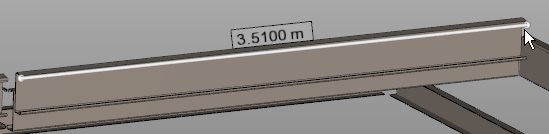
- 3D Measure Distance Tool. The Measure Distance
tool is now available in 3D views.
|
|
 |
| |
| New and Improved 2D Functions |
| |
- 3D Projection of 2D Dimensions. Dimensions taken
on a 2D drawing can now be displayed in 3D.
|
|
 |
| |
|
 |
| |
- New Point Mode. Snap to points, polyline
selection and block count tools are now available
for raster measurement from vector drawing files.
- Measure Distance tool for multiple segments. The
Measure Distance tool will now snap to points, and
return values for multiple conjoined segments and
the enclosed angle and pitch between them.
|
|
 |
| |
| Other new features of dimensionX version 3.30
include: |
| |
| Drawings |
| |
- Google SketchUp files (.SKP) now supported for
2D and 3D Measurement of counts, lengths and areas.
- Multipage TIF files now allow all pages to be
added at once.
- Improved support for DGN files.
- Improved support for PDF files.
- Significant speed improvements to PDF files with
solid fills, images and certain types of hatching.
- Improved support for publishing comparison
drawings to DWF and PDF.
- Legend and headings now optionally published
with the drawing to PDF.
- Additional checking capabilities for duplicate
BIM objects.
|
| Dimensions |
| |
- Now possible to specify the folder when copying
a dimension group.
- The Dimension group name is now shown on the
properties hint when the cursor is placed over a
dimension on the drawing.
- Significant speed improvement when exporting
Dimensions to Excel®.
|
| General |
| |
- New notification system which advises users when
new dimensionX versions are available.
|
| |
| NEW RELEASE dimX 3.21 |
| |
| All clients with PAID up ASA fees can request the
new version 3.21 from the
request page |
| |
| New Features since dimX 3.01 |
| |
| General |
| |
- Windows 7 support
- New Revisions tab on the ribbon to make revising
drawings and workbooks easier and more accessible.
- A new utility RecoverX is now provided which
allows database backup files to be opened,
and browsed for information to restore. The selected
data can be exported from RecoverX
to an EXF file which can then be imported to
DimensionX.
- Ability to import DimensionX Data as a copy.
- Supertips are now displayed when you hover over
a command in the ribbon. Supertips show
the name of the feature and the keyboard shortcut
(if one exists) as well as a short
description how the feature works and what it is
for.
- Keyboard shortcuts now shown on context menus.
- Metric / imperial setting now stored system wide
instead of per user. It can still be
overridden by a user if their measurement system
differs from the system wide setting.
|
| Drawings (2D) |
| |
- Full Support for DWFx files (2D and 3D).
- Support for DGN files.
- Support for 12D drawing files typically used in
civil engineering.
- Dimension Groups now support weights and 3 other
custom dimension properties that the
user can set per dimension group. For example, you
could set the custom fields to hold the
Cut, Fill and Net Cut/Fill values for the dimensions
that are measured.
- Dimensions list columns can now be defined.
Available columns include Name, Floors,
Count, Length, Height, Area, Volume, Wall Area,
Zone, Weight and Date Added.
- Ability to drag and drop quantities from the
Dimension Groups list to Excel.
- Ability to publish a drawing to DWF.
- New option to show dimension properties in a
text box on the drawing when the mouse is
placed over the dimension.
- Hyperlinks in DWF files now supported. Clicking
a section marker links to the appropriate
drawing.
- More dimension group colours now available for
positive dimensions.
- Now possible to show a legend on the drawing
listing the currently shown dimension groups
and the colour of their dimensions.
- Ability to change the zone or height of multiple
selected dimensions.
- Layouts with viewports now able to be used for
drawing comparisons.
- Improved Best match algorithms when matching
lines automatically between revisions.
- Speed improvements on larger drawings especially
layouts with viewports.
- Speed and reliability improvements publishing
drawing window to PDF.
- Speed improvements to PDFs
- Speed improvements taking measurements
- Speed improvements switching layers on and off
and inverting layers
- Rendering and panning optimisations to assist
speed of displaying and moving around large
drawings.
- Context menu now shows the length of the
selected line on the drawing.
- Rebar measurement mode now possible with raster
drawings (based on raster measurement
mode).
- Improvements to the Measure Distance feature.
- Now possible to delete multiple dimension groups
at once.
- Vector dimensions can now be converted to raster
at any time.
- Improved functionality when changing height on
dimension groups.
- When adding a drawing containing multiple sheets
(such as pages in a PDF or layouts in a
DWF), the specific set of sheets to import can now
be chosen instead of all sheets.
- Layers list on drawings now displays full length
of screen to display more layers at once.
- When drawings are rotated between revisions, the
rotational offset can now be set to allow
the previous dimensions to be lined up to the new
drawing revision.
- Ability to measure from the same drawing on two
separate workstations at the same time.
- Best Match Working Area option to help focus in
on the most relevant area of a drawing
when the geometry is scattered to the extents of the
drawing.
|
| Drawings (3D & BIM |
| |
- Easily create and define Model Maps which allow
you to specify how BIM object properties
map to Dimension Groups and Dimensions using drag
and drop.
- New Model tree view within BIM drawings allowing
parts of the model to be easily selected
and displayed. Eg. Selecting walls in the model tree
filters the drawing to display only the
walls.
- Schedule window now available on BIM drawings.
- 3D measurement tools allowing counts, lengths
and areas to be easily taken off 3D drawings.
All supported 3D drawing formats allow 3D
measurements to be taken.
- Automatically takeoff the areas of face and mesh
objects on 3D drawings with shortcut key
(L key). Depending on the drawing, this often allows
complex curved 3D shapes to have their
surface area measured in a single click.
- Drawing comparisons are now possible for 3D DWFs
from Revit showing what has changed,
added, removed etc. in a full 3D view.
- Ability to copy and paste the full schedule
window, or part thereof to Excel for further
analysis..
- Ability to filter the schedule window by
selecting specific branches of the model tree. Eg.
Selecting Doors in the Model Tree produces an
instant Door Schedule.
- Ability to filter the displayed objects in the
drawing using various properties at once. Eg.,
Show me ‘all the 820 doors on level 2’ or ‘all
timber framed windows with a height of
600mm’.
- Ability to isolate dimension group in addition
to isolating a dimension. This only shows
objects on the drawing that have been measured in
the dimension group.
- Markups now supported on 3D drawings.
- Ability to set editing restrictions on Model
Maps to either Private or Shared. Private Model
Maps can be viewed by other users but not edited.
- The display of Object Properties when right
clicking on a BIM object on a drawing now has
an improved layout.
- Significant speed and memory improvements on BIM
drawings (especially on very large
drawings).
- Now possible to create a dimension group from an
object dimension while a folder is
selected.
|
| Projects and Buildings |
| |
- New Projects can now be added from the Select
Building dialog.
- Select All & Select None options provided on the
standard dimension groups selection when
adding a building.
|
| Installer |
| |
- Support for Windows 7 including updated Hasp
portable license key drivers.
|
| System Administration |
| |
- Icons on the left toolbar now separated into
Project and Measurement groups.
- Ability to dynamically filter and search for
items in the lists.
|
| dimensionX 3.01 |
| |
| Following the release of its new 3D engine in version 3.00, we are pleased to announce the release of version 3.01 which extends support to include the Autodesk 2010 formats. Version 3.01 also contains various speed improvements in the product in both the estimating and measuring components. Version 3.00 was a significant development for dimensionX and this latest release also contains general enhancements after feedback from the client base after using the new 3D features. |
| |
| WHAT'S NEW !!! |
| |
| The biggest change to dimX is the use of RIBBONS in place of menu's as shown below |
| |
| There are 3 ribbons which display the main options grouped in sections. |
| |
| Major menu options are available when the dimX button is clicked, which is the button in the top left hand side of ALL ribbon based programs: |
| |
| the dimX (or app) button. |
| |
| ...and |
| |
| - |
Improved revisioning system to further simplify updating dimensions |
| |
| - |
User definable colours for dimension groups |
| |
| - |
Ability to take raster style measurements from vector drawings |
| |
| - |
Extended support for PDF drawings |
| |
| - |
Support for Autodesk® 2010 file formats including Revit® |
| |
| - |
Improved memory usage for larger drawings |
| |
| - |
Integrated Office 2007 style ribbon provides simplified user interface. |
| |
|
| |


